
Upscale
Increase image resolution by 2x or 4x, or use Enhance to improve quality without changing size.
What is Upscale?
Upscale improves the resolution and clarity of generated images. Use it to prepare visuals for storefronts, social feeds, or large formats.
You can choose between 2x, 4x, and Enhance options, with a maximum output resolution of 4K.
When to Use
Use Upscale as the last step before exporting. Many tools render at 1K, and upscaling ensures your final images are sharp enough for their intended use.
How to Use It
Select Upscale from the Toolbar
Select Upscale from the toolbar in Studio, then upload an image or choose one from your history.
Choose an Upscale Option
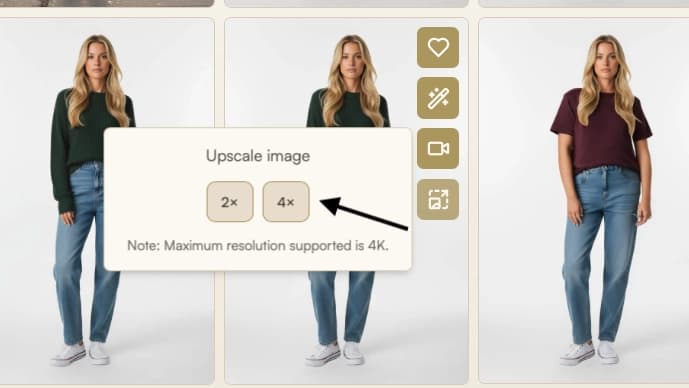
Select 2x, 4x, or Enhance and click Run. Processing starts automatically.
- 2x: Doubles resolution for sharper web use. Enhances detail such as skin texture, iris, hair, and fabric while keeping results realistic. (Recommended for most use cases.)
- 4x: Produces high-resolution output for full-screen or print (up to 4K). May add imagined details but can reveal more texture and depth when it works well.
- Enhance: Improves image quality by adding detail, refining textures, and sharpening edges without changing the resolution. Useful for images already at 4K where further upscaling is not possible.
Review and Save
When processing completes, the upscaled version appears in your history and in Gallery. Download in original quality, or use Export for Web.
Parameters
| Parameter | Description |
|---|---|
| Image | The image to upscale, uploaded or selected from history. |
| Upscaling factor | Choose 2x, 4x, or Enhance. |
Limitations
- Up to 4K resolution is supported.
Best Practices
- 2x upscale is more reliable for most images; 4x can add more detail but may introduce artifacts.
- Use Enhance when your image is already at 4K or has sufficient resolution but needs higher visual quality.
- Treat upscaling as the last step before export. Many tools render at 1K. If you open an upscaled image in Edit again, it will be processed at 1K and you will need to upscale again before exporting.
- For web publishing, prefer Export for Web with default settings (WebP, 95% quality). Raw 4K images can exceed 10MB and are not suitable for web.
Troubleshooting
If your upscale does not look right, try the following:
- Distortion or artifacts: If using 4x upscale, switch to 2x. If already on 2x, check whether the distortions were present in the original image and were simply amplified during upscaling.
Where Next?
After upscaling, the post-result suggestion bar offers quick access to related tools:
- Export optimized files with Export for Web